Scripts
ds-advancedpedmenu


 standalone
Requirements
- Server v7290 or newer
- OneSync Infinity
Overview
# DS Advanced Ped Menu
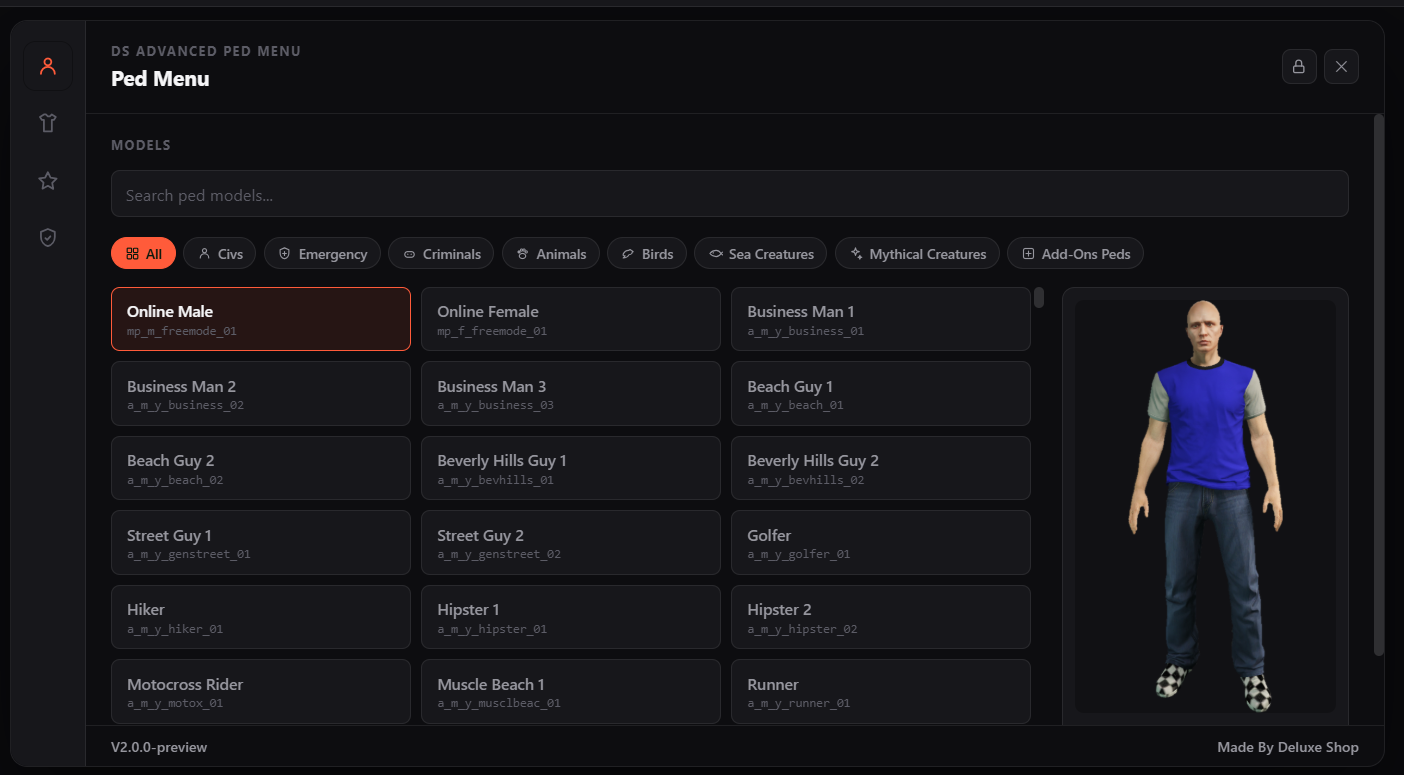
A ped menu for FiveM with a curated model catalog, ped portraits, saved peds, a clothing tab, quick-switch keybinds, switch effects, and an admin panel for granting, removing and blocking peds.
- No database required. Everything is saved to JSON files inside the resource.
- Works with QBCore, Qbox, ESX and ND_Core, or standalone (admin access then falls back to ACE permissions).
- Appearance saving works with illenium-appearance, fivem-appearance, qb-clothing and esx_skin, or with the native fallback (see [Appearance systems](#appearance-systems)).
## Features
### Models
- A catalog of peds in 7 categories: **Civs, Emergency, Criminals, Animals, Birds, Sea Creatures, Mythical Creatures**, plus an **Add-Ons Peds** category for your own models.
- Search by name or model, or filter by category.
- **Ped preview:** hover a ped to see its portrait on the right side of the grid. When the pointer leaves the grid, the preview returns to the ped you selected.
### Clothing
- Change what you're wearing and its colour with arrows (mask, hat, glasses, ears, shirt, undershirt, vest, arms, chain, watch, bracelet, pants, bag, shoes).
- A preview camera with rotate, zoom and height controls. The panel docks to a corner while this tab is open so your character stays visible.
- Works best on the Online Male / Online Female models.
### Saved Peds
- Save your current ped, with its full appearance, under a name (up to `Config.MaxSavedPeds`, default 40).
- Give each saved ped a switch particle effect and a switch animation.
- Assign saved peds to quick-switch keybind slots.
- **Reset To My Original Character** returns you to the look you had the first time the menu opened for you (see [Reset To My Original Character](#reset-to-my-original-character)).
### Admin
-
**Grant** a ped to a player, and **Remove** a granted ped.
-
**Block** a whole category for a player.
-
**Remove Ped** from the catalog. Removed peds go to a backup list and can be restored.
-
**Import Add-Ons** reloads `data/addons/import.txt` without a restart.
### Effects
- Particles: Transform Flash, Smoke Puff, Fireworks, Money Rain.
- Animations: Celebrate, Dance, Salute, Thumbs Up.
- Presets live in `shared/effects/effects.lua`. Both can be switched off in the config.
### Panel layout
- The lock button in the header unlocks the panel so it can be moved and resized. Each player's layout is saved.
## Requirements
- FiveM server with `cerulean` fx_version and Lua 5.4.
- One supported framework is recommended: QBCore, Qbox, ESX or ND_Core.
- An appearance script is optional but recommended (see [Appearance systems](#appearance-systems)).
## Installation
1. Put the resource folder in your server's `resources` directory as `ds-advancedpedmenu`.
2. Add `ensure ds-advancedpedmenu` to your `server.cfg`, after your framework and appearance script.
3. (Optional) Give yourself admin, either way:
- Add your Discord user id to `Config.Admin.AdminDiscordUserIds` in `shared/config/config.lua`.
- Or add an ACE permission:
```cfg
add_ace identifier.license:YOUR_LICENSE pedmenu.admin allow
```
- Start the server and open the menu with
/pedmenuor **F9**.
After changing any file, including images in `web/assets`, restart the resource with `restart ds-advancedpedmenu`. FiveM caches NUI files.
## Usage
| Action | How |
| --- | --- |
| Open the menu | /pedmenu or **F9** (rebindable in Settings > Key Bindings > FiveM > ds-advancedpedmenu) |
| Quick-switch to a saved ped | Slot keybinds **F1-F8** by default, if `Config.Keybinds.Enabled = true` |
| Move or resize the panel | Click the lock icon in the header |
## Configuration
Everything is in `shared/config/config.lua`.
| Setting | Default | What it does |
| --- | --- | --- |
| `Config.Framework` | `'auto'` | `'auto'`, `'qbcore'`, `'qbox'`, `'esx'` or `'nd_core'` |
| `Config.Locale` | `'en'` | Language file in `shared/locales` |
| `Config.Debug` | `true` | Prints extra info to the console. Set to `false` in production. |
| `Config.AppearanceSystem` | `'auto'` | `'auto'`, `'illenium-appearance'`, `'qb-clothing'`, `'fivem-appearance'`, `'esx_skin'`, `'native'` or `'custom'` |
| `Config.Cooldown` | `3000` | Milliseconds between ped switches. `0` disables it. |
| `Config.MaxSavedPeds` | `40` | Saved peds per player |
| `Config.Command` | `'pedmenu'` | Chat command that opens the menu |
| `Config.OpenKeybind` | `'F9'` | Default open key |
| `Config.DisableOpenKeybind` | `false` | `true` makes it command-only |
| `Config.Keybinds` | disabled | `Enabled`, number of `Slots`, and default keys for quick-switch |
| `Config.Effects` | on | Turn particles or animations off, set default duration and scale |
| `Config.Admin` | see file | ACE permission and Discord ids that count as admin |
| `Config.AllowedUsers` | open | Whitelist and grant rules (below) |
### Access control
`Config.AllowedUsers` controls who gets in and what they can use. Admins always bypass every gate.
- `WhitelistOnly`: when `true`, only admins and the licenses in `WhitelistedLicenses` can open the menu.
- `RequireGrantForPeds`: when `true`, non-admins can only switch to peds an admin has granted them. This also applies to saved peds and keybind quick-switch.
- `UseDiscordId` / `DiscordUserIds`: an extra gate that requires the player's Discord account to be on the list. No Discord bot is needed, because the `discord:\` identifier comes from FXServer.
To get a Discord user id, enable Developer Mode in Discord (User Settings > Advanced), then right-click the member and choose **Copy User ID**.
## Ped images
Portraits are PNG files in `web/assets`, one folder per category:
```
web/assets/
civs/ emergency/ criminals/ animals/ birds/
seacreatures/ mythicalcreatures/ customs/
```
- The file name is the ped's model name in lowercase, for example `a_m_y_business_01.png`.
- The folder name is the category name in lowercase with spaces removed ("Sea Creatures" becomes `seacreatures`).
- A ped with no image shows "No preview available."
- **Add-Ons Peds** use `web/assets/customs/.png` only. If there is no file there, no preview is shown for that ped.
- A few built-in peds have no image because the source set doesn't include one.
- If you add images while the server is running, restart the resource so FiveM serves them.
## Adding custom peds
1. Stream your ped model resource as usual.
2. Open `data/addons/import.txt` and add one entry per line:
```lua
{ model = "my_custom_ped", label = "My Custom Ped" },
```
Models must be letters, numbers and underscores only. Up to 500 add-on peds are loaded.
- In the in-game **Admin** tab, press **Import Add-Ons**. No restart is needed.
4. (Optional) Save a portrait as `web/assets/customs/my_custom_ped.png` and restart the resource.
## Admin
Open the **Admin** tab, which is visible to admins only.
-
**Remove Ped** moves a ped out of the catalog and into
shared/peds/backuppeds/data.txt. **Restore** puts it back in its original category. Deleting its line from that file removes it for good.
- Grants, blocks and saved peds are stored in `data/saves/`.
## Reset To My Original Character
- The first time the menu opens for a player, the resource records their current model and appearance.
- The record is saved once per Rockstar license in `data/saves/pedmenuoriginal/data` and is never overwritten.
- **Reset To My Original Character** reapplies that record. It is always allowed, even with `RequireGrantForPeds` on, but it still uses the switch cooldown.
- The record is a snapshot. If a player later changes their clothes or tattoos with another script, reset restores the older look.
- To record a fresh one, delete that player's entry from `data/saves/pedmenuoriginal/data` while the server is stopped.
## Appearance systems
Saving a freemode ped's face, hair colour and tattoos needs a supported appearance script, because GTA has no native to read them back.
| System | Notes |
| --- | --- |
| `illenium-appearance` | Full support: face, hair, tattoos, clothing |
| `fivem-appearance` | Full support: same API as illenium |
| `qb-clothing` / `esx_skin` | Detected, but falls back to native capture (components and props only) |
| `native` | Components and props only. Hair colour is reset to black, with no face or tattoos. |
| `custom` | Set `Config.CustomAppearance` to your own get and set exports |
With `'auto'`, the resource picks the first one it finds running. Non-freemode peds (animals and NPC models) always use native capture.
## Data files
| Path | Contents |
| --- | --- |
| `data/saves/pedmenusaved` | Each player's saved peds |
| `data/saves/pedmenugrants` | Admin ped grants and category blocks |
| `data/saves/pedmenuoriginal` | Original character records |
| `data/saves/playersuisaveds` | Each player's panel position and size |
| `data/addons/import.txt` | Your add-on peds |
| `shared/peds/backuppeds/data.txt` | Peds removed from the catalog |
Back up `data/saves` before updating the resource.
## Troubleshooting
-
**Images not showing:** check the folder and file names are lowercase and match the model name, then restart the resource.
-
**Menu changes not appearing:** restart the resource. NUI files are cached.
-
**Can't open the menu:** check `WhitelistOnly` and `UseDiscordId` in the config. Admins always bypass them.
-
**No admin tab:** your Discord id must be in `Config.Admin.AdminDiscordUserIds`, or you need the `pedmenu.admin` ACE permission.
-
**Hair looks wrong or tattoos are missing after switching:** install a supported appearance script. Without one, only components and props are saved.
## Credits
- Author: Deluxe Shop
- Ped portraits are from the [FiveM docs repository](https://github.com/citizenfx/fivem-docs/tree/master/static/peds).